Sometimes, it may happen that your WordPress blog gets hacked and the hacker changes your administrator password. He may also change your e-mail address. In this case, you cannot reset your password directly from “Lost Password”. But don’t worry, I’ll tell you a way to reset your WordPress password and also your e-mail address directly through phpMyAdmin. Resetting WordPress administrator password is very easy through phpMyAdmin.
Following are the steps to change WordPress password through phpMyAdmin:
Step 1: Login to your phpMyAdmin using your SQL Database username and password
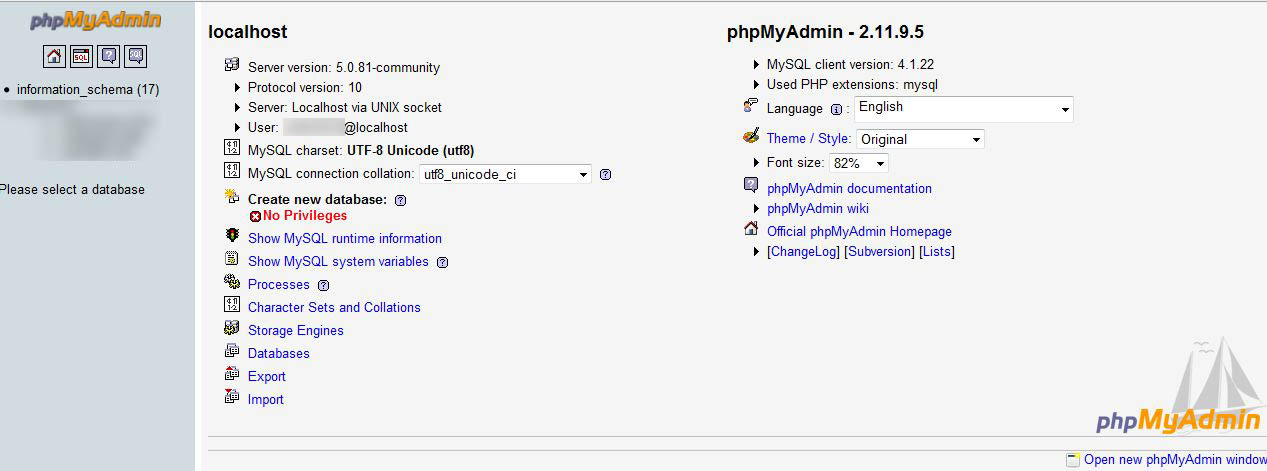
This can be done through cPanel of your host.
Step 2: Browse to your blog’s database

Step 3: Find wp_users:
(Edit the default WordPress table prefix “wp_” if needed)
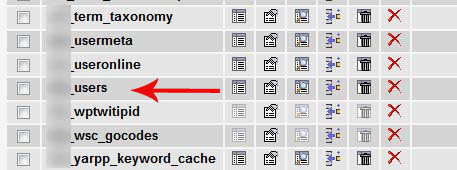
Once you click on browse in your wp_users database, you will be shown the users on this blog. Scroll down to the ID which says user_login as admin(by default). Once there click on edit button, the edit button will appear as a pencil logo.

Step 4: Edit the values:
Once clicked on edit, you will be taken to a page that appears as below. Here the third field user_pass will have MD5 hashed password under the value column. This value is not in plain text. WordPress, by default, hashes the password to MD5 salt for security reasons.
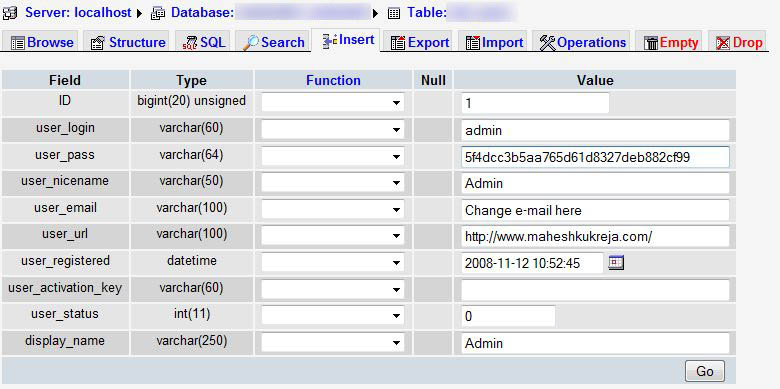
If you want your WordPress administrator password to be “password“, change the value of user_pass to 5f4dcc3b5aa765d61d8327deb882cf99 and click the Go button and then log in to WordPress using your new password..
If you want your password to be different, you can use online MD5 hash generators to generate hash of your required text. You can search Google for “online MD5 generator”, etc.
Example: http://www.adamek.biz/md5-generator.php
Also, if you want to change e-mail address, you can edit value of user_email row.
If you want to change WordPress username, check this tutorial!
{ 13 comments… read them below or add one }
Thanks for the explanation. I was surprised to see that wordpress uses only md5 to store passwords. Given the number of md5 dictionaries you can find online, it could simply use plain text to store password.
Everybody that uses wordpress should know how to do this. It’s a little scary how many wordpress installs get hacked, and you’ve gotta start here to lock the hacker out.
I’m a bit uncomfortable going there, but I see the value of your tip. Knowing this stuff is part of the territory in blogging. Helpful tip, this one. 🙂
I got my wordpress Hacked as I tried to Log into it I requested my Password and it Said no such user but I got worried and As it was a new blog I just deleted it from my Server. I now Use B2evolution and it had warnings about my Php Settings
PHP register_globals
PHP allow_url_include
PHP allow_url_fopen
That they Should always be set to Off i don’t know much about Php but I think this Was the Cause
When I was very new to Wordpress I faced a Situation that I forgot my Password and dint know what to do. I literally follow all my password except for my hosting account. This method came to be useful that time.
wow,thanks for information sir
very useful
Millions of thanks to you buddy! My site just got hacked. I was able to get back to my wp dashboard because of this very helpful post. Now, I’m trying to find out what to do next to restore my site to its former main page. As of this writing, it’s still bearing the hacker’s main page. Grrr.
Nothing is working for me for some reason. No matter what I put in my password thing it says wrong password.
I can’t do the email reset, which also used to work.
Why isn’t this working any idea?
Hi Drew,
Try the following: Type in your new password in user_pass value in regular format without hashing (Note: The password entered here is case sensitive). Then select MD5 from the Function drop down list and click Go.
Let me know what’s your result.
-Mahesh.
HI Mahesh,
It looks like now the image verification isn’t working… It’s possible that was part of the problem(?) Come to think of it I don’t think I have ever logged in since adding the captcha image verification on to the blog… Or at least I don’t remember having to.
Now the message reads only specific to the image reading (I have tried many times it is easy to read so there must be something wrong with it):
”
Note: The verification code must be the same as the one from the generated image to continue (click on image to generate another)
“
Okay! So try disabling that plugin then and try..
Heck yeah this is exactly what I am looking for. I built a website for someone who then sold if off before I could remove my personal info. And of course the guy who bought the site immediately changed my login stuff even though I was an admin.
Your advice has helped me banish a hacker’s pawprints from my site. Now I can get back to blogging. Thanks a million!
{ 1 trackback }