Many of you may be knowing that changing WordPress login username is one of the ways to protect your WordPress blog. After a fresh install of WordPress on your host, you sign in with the default username “admin“. You cannot change this username directly from the Admin panel.
But don’t worry! There’s another way to change this username. It’s through phpMyAdmin. This is not a new hack/method. But, it’s quite useful from security point of view, esp. for WordPress newbies.
Following are the steps to change WordPress username through phpMyAdmin:
Step 1: Login to your phpMyAdmin using your SQL Database username and password
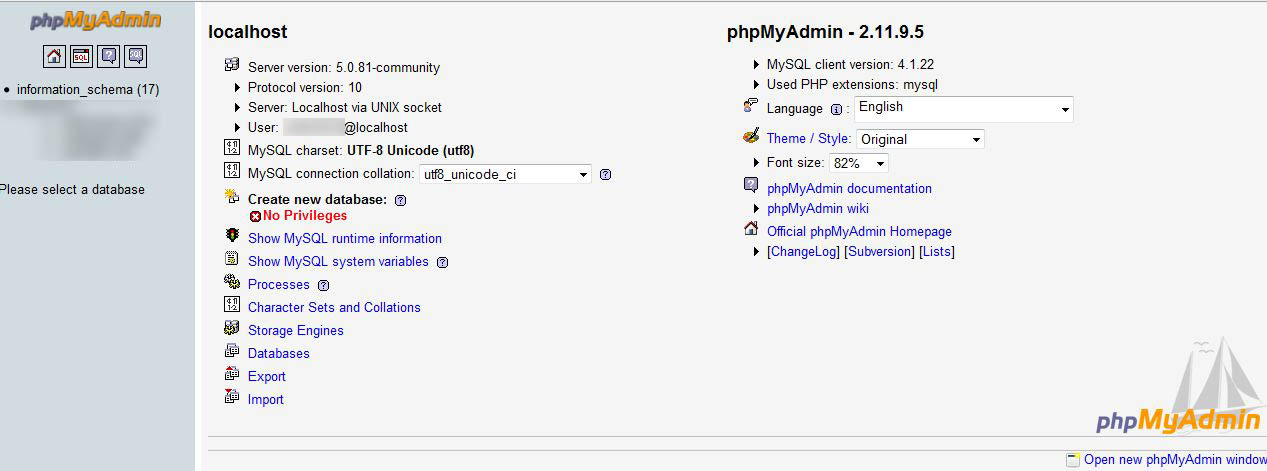
This can be done through cPanel of your host.
Step 2: Browse to your blog’s database

Step 3: Find wp_users:
(Edit the default WordPress table prefix “wp_” if needed)
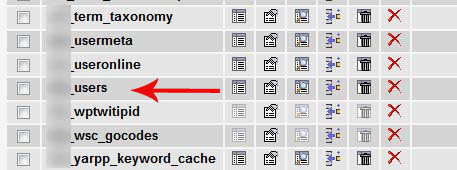
Once you click on browse in your wp_users database, you will be shown the users on this blog. Scroll down to the ID which says user_login as admin(by default). Once there click on edit button, the edit button will appear as a pencil logo.

Step 4: Edit the values:
Once clicked on edit, you will be taken to a page that appears as below. Here the second field user_login will have admin under the value column. Change this from admin to anything you prefer.

Once done with the change save and click go on the page.
There we have changed the WordPress user from the default admin to something we prefer. This is one way to ensure your WordPress blog is one step secure than it was before.
Happy Blogging.
{ 16 comments… read them below or add one }
A very detailed information on how to change it. Keep it up and more power!
Nice one. could be useful for me in the future.
Thanks – Actually got bored with admin!
Lol uday. Same here got bored with admin hehe
Thank you! I am in the process of manually reinstalling my wordpress and this post was extremely helpful.
I figured it was this easy but didn’t know if it might affect my posts and such. Good to see it doesn’t!
Thanks for posting this great tutorial!
JD
Thanks for the information, I already change the prefix wp_ to something else for security reasons, and never really thought much about changing the user name. Everything we can do to keep our blogs a little more secure is always worth doing these days. Thanks again, great post.
AWESOME….I always wondered how you could change you username if anything ever happened to my wordpress blog. What else can phpmyadmin do I wonder?
Thanks, worked perfectly!
tha ks for the step-by-step guide tutorial, changing default username is necessary to make your blog secure
I just followed your instructions and it worked like a charm. A big thank you!
THANK YOU so very much for your very detailed instructions WITH PICTURES! I followed them exactly and it worked PERFECTLY. You are a generous and kind person to offer this info. Thanks again.
Thanks Mahesh,
Perfectly executed. 🙂
I have changed my user name by reading this article.
thanks
Great tutorial. Very helpful.
Many many thanks.
{ 3 trackbacks }